Olin College of Engineering · Computational Robotics 2025

Neato Fleet

A centralized multi-robot traffic control system utilizing Reciprocal Velocity Obstacles (RVO2) for collision-free navigation.

View on GitHub

Project Context

This project was developed for the Computational Robotics course at Olin College of Engineering.

While introductory robotics often focuses on single-agent pathfinding, this project aims to tackle global fleet management: coordinating multiple robots in a shared space without predefined lanes. The goal was to implement a decentralized-style collision avoidance algorithm (RVO2) within a centralized ROS 2 framework.

The Platform: Neato XV-11 A low-cost differential drive vacuum robot hacked for research with a Raspberry Pi and 2D LiDAR. While accessible, it lacks internal IMUs and precise encoders, leading to significant dead-reckoning errors.
Core Learning Goals

1 System Architecture

Designing a modular ROS 2 system that strictly decouples Configuration (YAML), Planning (Python/RVO2), and Execution (Hardware).

2 Algorithmic Depth

Moving beyond Position-Space planning to Velocity-Space planning. Implementing linear programming constraints to solve for safe velocity vectors.

3 Hardware Abstraction

Identifying hardware bottlenecks (noisy encoders, latency) and developing mitigation strategies (Open-Loop Trajectory Transfer) to validate algorithms despite physical limitations.

System Architecture

The system is implemented as a modular ROS 2 Humble architecture with global state awareness. A single controller node aggregates the state of all robots, solves the optimization problem, and distributes commands.

To address the hardware limitations (drift & latency), we split the architecture into two distinct pipelines:

1. Simulation Pipeline

Uses Gazebo Simulator to provide ground truth. The rvo_fleet_controller.py runs in a perfect physics environment to generate an ideal trajectory, which is captured to CSV.

2. Execution Pipeline

The cmd_player.py node reads the CSV and streams velocity commands to the physical robots open-loop, bypassing the noisy onboard sensors entirely.

ROS 2 Topic Structure

Each robot operates in its own namespace (/robot1, /robot2, etc.) with standardized topic names. The controller subscribes to /robotN/odom for position feedback and publishes to /robotN/cmd_vel for velocity commands.

Design Choice Keeping planning centralized simplifies safety reasoning and makes debugging multi-robot interactions significantly easier. A single node has complete visibility into all robot states, eliminating distributed consensus problems during development.

Fleet Controller

Aggregates odometry from all robots, runs RVO2 collision avoidance, publishes synchronized cmd_vel. All parameters configurable via YAML.

Goal Publisher

Dynamically loads scenarios from YAML config—add new scenarios without code changes. Visualizes goals in RViz.

Command Recorder

Records timestamped trajectories from simulation for deterministic hardware playback.

Command Player

Frame-accurate open-loop replay with automatic stop detection.

YAML Config

Single config file controls robot count, positions, scenarios, RVO2 parameters, and obstacle locations.

Launch System

One command starts entire system: Gazebo, controller, goals, and recorder coordinated automatically.

Phase 1: Simulation & Capture
YAML Config fleet_config.yaml
RVO Controller rvo_fleet_controller.py
Gazebo Sim Physics Engine
CSV Artifact trajectory_[date].csv
Phase 2: Open-Loop Playback
CSV Artifact trajectory_[date].csv
Cmd Player cmd_player.py
Physical Fleet Neato XV-11 (x3)

Algorithm: RVO2

We selected Reciprocal Velocity Obstacles (RVO2). Our implementation utilizes the Python-RVO2 library, a Python binding of the standard RVO2 library, based on the foundational work "Reciprocal Velocity Obstacles for Real-Time Multi-Agent Navigation" (van den Berg et al., ICRA 2008).

Why Velocity Space?

Unlike traditional pathfinding that plans in position space, RVO2 operates in velocity space. For each nearby agent, it constructs a "Velocity Obstacle"—a cone of velocities that would lead to collision within time horizon \( \tau \). The algorithm then selects the velocity closest to the preferred (goal-directed) velocity that lies outside all forbidden cones.

The Oscillation Problem

The original Velocity Obstacle (VO) approach treats other agents as passively moving obstacles. When two agents both apply VO independently, they each dodge fully—but this makes their original velocities suddenly safe again. Both agents revert, detect collision risk again, dodge again... creating oscillatory "dances."

RVO solves this by having each agent take responsibility for only 50% of the avoidance effort. Mathematically, the RVO cone's apex is translated to the midpoint \( \frac{v_A + v_B}{2} \), ensuring that when both agents follow RVO, their combined adjustments produce a collision-free trajectory without oscillation.

Key Takeaways From the Paper
  • Collision-Free: If both agents choose velocities outside each other's RVO on the same side, the resulting velocities are guaranteed collision-free.
  • Same-Side Selection: If each agent picks the velocity closest to its current velocity outside the RVO, both automatically choose the same side to pass.
  • Oscillation-Free: After choosing new velocities, the old (preferred) velocity remains inside the new RVO, preventing the reversion that causes oscillations.

Algorithm Selection Rationale

RVO2 was chosen because it provides provable collision-free guarantees with linear time complexity per agent, making it suitable for real-time multi-robot coordination.

Limitations & Critique

  • Perfect Sensing Assumption: The theoretical guarantees require accurate relative position and velocity data. Our Neato's encoder drift violates this assumption, which is why we pivoted to open-loop playback.
  • Holonomic Assumption: RVO2 assumes agents can instantly move in any direction \( (v_x, v_y) \). Differential-drive robots cannot; we implemented a P-controller to convert holonomic velocities to \( (v, \omega) \) commands, introducing tracking error.
  • No Global Path Planning: RVO2 is purely local/reactive. Agents can get stuck in U-shaped obstacles or deadlocks. From our research, other systems typically pair RVO2 with a global roadmap planner.
  • Static Environment Assumption: While RVO2 handles moving obstacles, it assumes the environment geometry is known. Dynamic obstacles (humans walking through) require sensor integration we didn't implement.
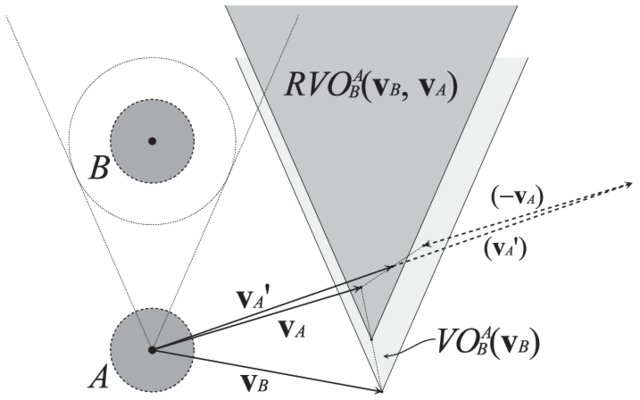
RVO diagram from paper
The Reciprocal Velocity Obstacle \( RVO_{A|B}(v_B, v_A) \) of agent B to agent A
The Velocity Obstacle (VO) Definition
The set of velocities \( v_A \) for agent \( A \) that result in collision with \( B \): $$ VO_{A|B}(v_B) = \{ v_A \mid \lambda(p_A, v_A - v_B) \cap B \oplus -A \neq \emptyset \} $$ where \( \lambda(p, v) = \{ p + tv \mid t \geq 0 \} \) is a ray from \( p \) in direction \( v \), and \( B \oplus -A \) is the Minkowski sum.
The Reciprocal Velocity Obstacle (RVO)
Translating the VO apex to share avoidance responsibility: $$ RVO_{A|B}(v_B, v_A) = \{ v'_A \mid 2v'_A - v_A \in VO_{A|B}(v_B) \} $$ Geometrically: the VO cone translated so its apex is at \( \frac{v_A + v_B}{2} \).
Velocity Selection (Linear Program)
Each agent solves: $$ v'_i = \arg\min_{v'' \in AV_i} \left( w_i \cdot \frac{1}{t_c(v'')} + \| v^{pref}_i - v'' \| \right) $$ where \( t_c \) is time-to-collision and \( AV_i \) is the set of kinematically admissible velocities.
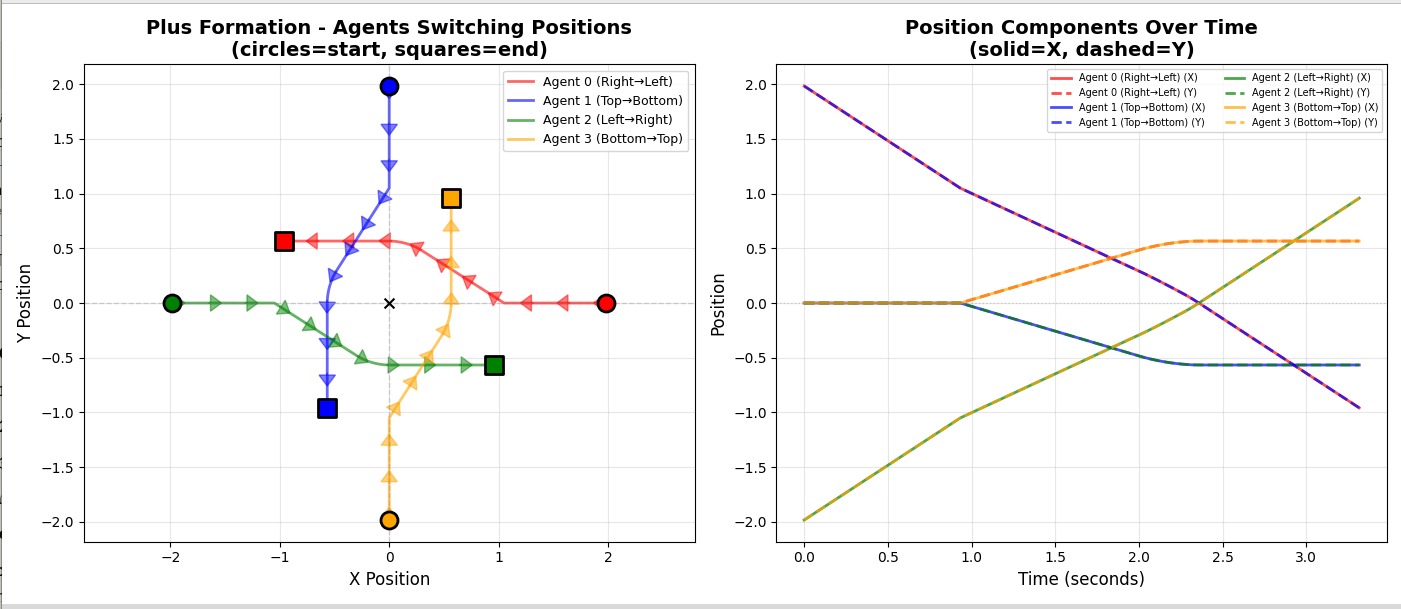
RVO diagram
Position plots of 4 robots switching positions in a plus formation
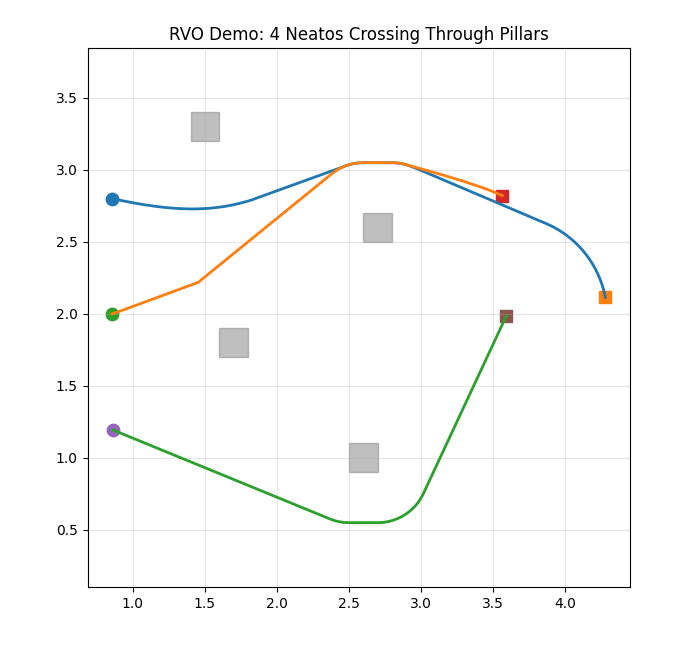
Sim Pillars
Simulation Environment: 3 robots navigating around static obstacles using RVO2.

Key Parameters

time_horizon
5.0 s
Lookahead time \( \tau \). High value = smoother, earlier reactions.
neighbor_dist
10.0 m
Radius to consider other agents. Covers the full test arena.
max_speed
0.2 m/s
Capped for safety during hardware testing.
time_horizon_obst
2.0 s
Shorter horizon for static obstacles allows tighter maneuvering near walls.
robot_radius
0.33 m
Physical footprint plus safety margin.
control_rate
10 Hz
Balance between responsiveness and computational load.
rvo_fleet_controller.py Solving Differential Constraint
def convert_to_twist(self, vx, vy, yaw):
    # RVO gives global (vx, vy). We need (v, w).
    desired_heading = math.atan2(vy, vx)
    error = self.normalize(desired_heading - yaw)
    
    cmd = Twist()
    cmd.linear.x = math.sqrt(vx**2 + vy**2)
    # P-Controller to steer into the vector
    cmd.angular.z = 2.0 * error 
    return cmd
Algorithm Pipeline
  1. Preferred Velocity: Each robot computes a velocity vector pointing toward its goal at maximum speed
  2. Velocity Obstacle Construction: For each nearby robot, compute the cone of velocities that would cause collision within the time horizon
  3. Reciprocal Sharing: Each robot takes half the avoidance responsibility, shifting the cone boundary inward
  4. Safe Velocity Selection: Solve a linear program to find the velocity closest to preferred that avoids all cones
  5. Twist Conversion: Transform the global-frame velocity to robot-frame (linear.x, angular.z) commands

Static Obstacle Handling

RVO2 supports static obstacles as polygons. We model each obstacle as a square and pass corner vertices to RVO2. The algorithm treats these as infinite-mass agents, ensuring robots maintain clearance from walls and pillars.

Time Horizon Parameter

The \( \tau \) parameter controls how far ahead agents look for collisions. Larger values yield smoother avoidance but require earlier deviation from preferred velocities. We tuned this to balance responsiveness with stability.
Open-Loop Trajectory Transfer

Because the Neato's odometry is too noisy for the RVO2 algorithm (which requires precise relative velocity sensing), we utilized a Record-and-Replay strategy.

A critical implementation detail was ensuring that \( t=0 \) was identical for all robots. The cmd_recorder node subscribes to a debug topic and waits for a goals_received flag before writing to CSV. This ensures that when we replay the files, the fleet starts in perfect unison.

Why Open-Loop Trajectory Playback?

  • Odometry Unreliability: The Neato XV-11 wheel encoders exhibit significant drift due to wheel slip. Over a 10-second maneuver, position estimates can diverge from ground truth.
  • Network Latency: Running a centralized controller over WiFi introduces some round-trip latency. RVO2 assumes instantaneous state information.
  • Sensor Noise Amplification: RVO2 computes velocities based on relative positions. When both robots have noisy position estimates, the relative position error compounds.

Hardware Deployment Workflow

  1. Record in Simulation: Run ros2 launch neato_fleet rvo_fleet.py to execute your scenario in Gazebo. The cmd_recorder captures all velocity commands to a timestamped CSV file.
  2. Connect Real Robots: Launch each Neato with unique namespaces via neato_node2 bringup_multi.py, assigning distinct robot names and UDP ports.
  3. Playback Trajectory: Run ros2 run neato_fleet cmd_player with the recorded CSV file. The player republishes velocity commands at the original timing.
The Synchronization Handshake Code logic to ensure all robots begin recording at the exact same timestamp.
cmd_recorder.py Sync Logic
def debug_callback(self, msg):
    """Check if goals have been received from controller"""
    try:
        data = json.loads(msg.data)
        if data.get('goals_received', False) and not self.goals_received:
            self.goals_received = True
            self.recording = True
            self.start_time = self.get_clock().now().nanoseconds / 1e9
            self.get_logger().info('RECORDING STARTED')
    except json.JSONDecodeError:
        pass
cmd_player.py Playback Loop
def playback_tick(self):
    """Main playback loop"""
    if not self.playing or self.finished:
        return
    
    current_time = self.get_clock().now().nanoseconds / 1e9
    elapsed = current_time - self.start_time
    
    # find the frame that matches current elapsed time
    while (self.current_frame < len(self.frames) - 1 and 
           self.frames[self.current_frame + 1].timestamp <= elapsed):
        self.current_frame += 1
    
    # get current frame and publish commands
    frame = self.frames[self.current_frame]
    for i in range(self.num_robots):
        cmd = Twist()
        cmd.linear.x = frame.commands[i][0]
        cmd.angular.z = frame.commands[i][1]
        self.vel_pubs[i].publish(cmd)
cmd_player.py Auto-Stop
def finish_playback(self):
    """Handle end of playback"""
    self.finished = True
    self.playing = False
    
    # send stop commands
    stop_cmd = Twist()
    for pub in self.vel_pubs:
        pub.publish(stop_cmd)
    
    self.get_logger().info('PLAYBACK COMPLETE')
    self.create_timer(1.0, lambda: rclpy.shutdown())

Results & Evaluation

The system successfully coordinated 3 robots in a "Triangle Swap" scenario. The open-loop playback proved robust for durations under 30 seconds, after which wheel slip caused significant divergence from the planned path.

Visual comparison shows that the physical robots (top) faithfully executed the RVO2 avoidance behaviors calculated in simulation (bottom), validating the algorithmic approach.

Future Improvements

  • External Localization (Ground Truth): Integrating an overhead camera system (AprilTags) or OptiTrack would allow us to close the loop and run RVO2 in real-time.
  • Distributed RVO: Moving the calculation from the central laptop to the individual Raspberry Pis to reduce network latency.
  • Dynamic Obstacles: Using the local LiDAR to detect unmapped obstacles (e.g., people) and inject them into the RVO solver dynamically.

Top: Gazebo Simulation | Bottom: Physical Execution

Project Milestones

Our development followed an iterative approach, with each milestone building on lessons from the previous phase.

Milestone 1: Foundations

Established multi-robot control infrastructure: simultaneous velocity streaming to 3 Neatos from a single ROS 2 node, kinematics verification, Gazebo simulation environment matching physical robot geometry (0.33m radius), and algorithm selection of RVO2.

Milestone 2: Centralized Execution

Integrated Python-RVO2 into the ROS 2 control loop with configurable parameters via YAML. Demonstrated collision-free navigation in simulation. Identified sim-to-real gap through initial hardware tests. Odometry drift over 10-second maneuvers made closed-loop control unreliable.

Final Demo: Hardware Validation

Successfully demonstrated 3-robot position swap on physical Neato hardware using open-loop trajectory playback. Validated that pre-recorded commands execute reliably when initial positions are consistent.

Lessons Learned

1 Odometry is the Bottleneck

Wheel encoders on consumer robots are fundamentally unreliable for multi-robot coordination. Future systems need visual odometry or external tracking.

2 Simulation Fidelity Matters

Matching physical parameters (radius, max speed, acceleration limits) between sim and real is critical for trajectory transfer.

3 Open-Loop is Underrated

For short maneuvers with consistent initial conditions, pre-computed trajectories can be more reliable than noisy closed-loop control.

4 Centralized Debugging

Having all state in one node made it trivial to log, visualize, and replay multi-robot interactions during development.

Source Code & Configuration

All source code is organized as a ROS 2 package supporting both simulation and hardware execution. The repository includes the centralized controller, RVO2 integration, scenario configurations, and trajectory recording/playback tools.

One-Command Launch

The entire system—Gazebo simulation, RVO2 controller, goal publisher, and trajectory recorder—launches with a single command:

ros2 launch neato_fleet rvo_fleet.py

Key Components

  • rvo_fleet_controller.py: Central RVO2 planner and velocity publisher
  • fleet_goals.py: YAML-based goal scenario publisher
  • cmd_recorder.py: Trajectory recording from simulation
  • cmd_player.py: Open-loop playback on real robots
  • multi_neato_world.py: Gazebo world launcher with dynamic robot spawning
  • rvo_fleet.py: Main launch file coordinating all nodes
fleet_config.yaml Configuration
# RVO2 Controller Configuration
/rvo_fleet_controller:
  ros__parameters:
    num_robots: 3
    control_rate: 20.0      # Hz
    max_speed: 0.2          # m/s
    robot_radius: 0.35      # meters
    time_horizon: 2.0       # seconds
    
    # Starting positions [x1,y1, x2,y2, x3,y3]
    start_positions: [0.8, 2.8, 0.8, 2.0, 0.8, 1.2]

# Goal Scenarios
/fleet_goals:
  ros__parameters:
    scenario: "pillar"
    goals_swap: [3.8, 2.0, 2.9, 2.0, 2.0, 2.0]
    goals_pillar: [3.6, 1.2, 3.6, 2.8, 3.6, 2.0]
Creating Custom Scenarios Adding new scenarios requires only editing the YAML file—no code changes needed. Simply add a new goals_<name> entry and set scenario to match. The format is [x1, y1, x2, y2, ...] where each pair is the goal position for robot i.
Scaling to More Robots The system scales to any number of robots by updating num_robots and providing corresponding start/goal positions. The controller automatically creates publishers and subscribers for each robot namespace. Each list must contain exactly 2 × num_robots values (x, y pairs).

The Team

A collaborative effort combining systems engineering, algorithm design, and hardware testing.

Chang Jun Park

Chang Jun Park

Contributions
  • Contributed to writing the RVO2 fleet controller, ensuring outputs from PyRVO2 are properly passed to the simulator
  • Developed the command player and recorder for trajectory capture and playback
Key Takeaways

It was exciting to explore an algorithm used in real path planning applications for multiple robots. Looking forward, it would be even more interesting to implement real-time control using external visual localization (such as AprilTags) to establish ground truth positioning.

Challenges

As mentioned in the report, we had to pivot away from real-time control due to odometry noise and drift from the robots. However, I'm proud that the team agreed to make a hard pivot given our time and resource constraints. Sometimes systems don't work out as planned, and decisive pivots are necessary—I think this is a valuable lesson!

Akshat Jain

Akshat Jain

Contributions
  • Researched different algorithms for path planning for the Neatos
  • Worked on debugging the Neatos from running in real Gazebo to running it on the Neatos
  • Worked on the portfolio website
Key Takeaways

Through this project, I gained a strong understanding of how different path-planning algorithms are used to control robot movement. It was especially interesting to observe how solutions that work well in simulation change when applied to real-world environments, and how addressing these practical challenges requires additional time and iteration. Looking ahead, it would be exciting to explore decentralized approaches for controlling multiple Neato robots.

Challenges

It was interesting to observe the near-perfect performance of the Neato robots within the Gazebo simulation environment. However, the translation of the code to the physical Neato platforms presented a significant challenge. A key decision was necessitated by persistent issues with odometry data accuracy, leading us to adopt a strategy of pre-planned routes for the robots instead of real-time, dynamic navigation.

Dhvan Shah

Dhvan Shah

Contributions
  • Engineered the multi-robot Gazebo simulation environment, resolving critical namespace collisions to enable parallel agent training
  • Architected the YAML-based configuration workflow, allowing for rapid scenario testing without codebase modification
  • Led the design and development of the project portfolio website
Key Takeaways

I gained a deep appreciation for the power of "Simulation as Ground Truth." configuring the Gazebo environment to strictly match physical parameters was the breakthrough that made our open-loop playback strategy viable. I also learned how to leverage ROS 2 launch files to orchestrate complex multi-agent systems, which significantly accelerated our iteration speed.

Challenges

Coordinating contributions across different time zones was a significant logistical hurdle, particularly during my travel abroad. We also faced early friction in seperating tasks for the simulation and website structure, but establishing clear modular ownership (separating configuration from logic) ultimately streamlined our workflow and resolved these bottlenecks.

Zaraius Bilimoria

Zaraius Bilimoria

Contributions
  • Evaluated and validated the RVO2 library through extensive simulation testing and scenario design
  • Designed and implemented obstacle-rich environments to stress-test multi-robot collision avoidance
  • Tuned RVO parameters for both simulation and real-world Neato deployments to achieve stable, natural robot motion
Key Takeaways

I developed a strong understanding of the underlying mathematics behind the RVO2 algorithm, which helped me appreciate the abstractions provided by the library while still allowing me to reason about its behavior. This understanding made it significantly easier to tune parameters, diagnose unexpected motion, and iteratively improve performance based on observed robot interactions in both simulation and physical experiments.

Challenges

One of the primary challenges was bridging the gap between simulation and real-world execution. Several factors—such as latency, velocity command timing, and encoder drift—were not initially accounted for. We addressed these issues by pivoting to a record-and-playback approach for commanded velocities, which reduced uncertainty and allowed us to reliably reproduce behaviors observed in simulation on physical robots.